

Toolbars and Menus :
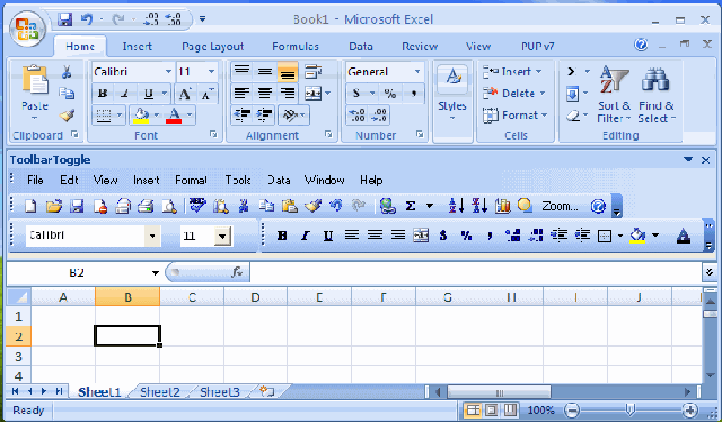
A menu displays a list of commands. A menu (or drop-down menu) is the way in which actions can be performed. Some of these commands have images next to them so you can quickly associate the command with the image. Most menus are located on the menu bar, which is the toolbar at the top of the screen.
Toolbars can contain buttons, menus, or a combination of both. A toolbar is just a collection of icons that provides a shortcut to using a drop-down menu. Toolbars offer quick shortcuts to commonly used commands and can be moved and repositioned.
Excel contains two main menu bars, over fifty pre-defined toolbars and over fifty pre-defined shortcut menus.
You can re-position any of the toolbars using the mouse and they can be docked to any side of the application window.
The menu bar contains commands that you can use to create, control, edit, delete, and format information in the Excel object:
1. File
2. Edit
3. View
4. Insert
5. Format
6. Tools
7. Data
8. Window
9. Help
The toolbar area also contains icons that correspond with specific commands. By default, the Standard toolbar and the Formatting toolbar are available when an Excel object is created:
To view the following toolbars, click View > Toolbars, and then click the toolbar that you want:
Toolbaar Decription
Standard Used to manage an Excel object.
Formatting Used to apply basic formatting in the Excel object.
Borders Used to design borders in the Excel object.
Charts Used to create and edit charts.
Control Toolbox
Drawing Used to add and manage controls such as list boxes, radio buttons etc.
Used to create and format drawings, and insert predefined shapes into the Excel object.
Exernal Data Used to import data into the Excel object from various external sources.
Important: Source data that is imported using External Data toolbar is not automatically refreshed by Cognos FSR. Best practice is to import data into an Excel object using the Load Data or Modify Data commands in the toolbar.
Forms Used to design forms with this toolbar.
Formulas Auditing Used to locate errors in formulas and display cell relationships. List Used to update and publish lists to a SharePoint site.
Picture Used to format and manage images that are in the Excel objec
Pivot Table Used to assist in creating and managing pivot tables.
Protection Used to password protect cells, worksheets, and workbooks.
Reviewing Used to track document changes in the Excel object.
Important: This is not the same as the Cognos FSR Audit Trail feature, which tracks every change made to an Excel
object by Cognos FSR users.
Customize Used to build a new toolbar and to edit an existing toolbar layout.